If you have a SPIKE robot built with the Hub lying horizintally, you can use the Hub’s built-in Gyro Sensor to measure how far the robot has turned to the right or left.
Turn right 90 degrees
The following Word Blocks program demonstrates how to use the yaw reading of the Gyro Sensor to execute a precise turn. The program starts the robot turning right, waits until the yaw angle is greater than 90 degrees, and then stops turning.
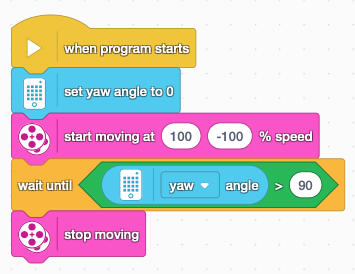
The starting moving at % speed block is in the More Movement section of the Block Palette.
Notice that we use set yaw angle to 0 to reset the yaw angle before starting the turn. Without this reset, the Hub considers yaw angle 0 to be whatever direction it’s facing when the program starts running.
Turn right X degrees
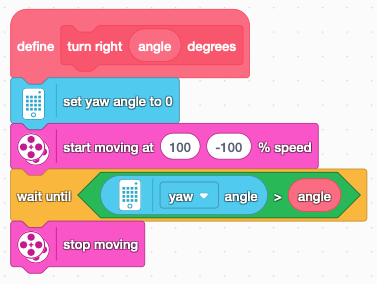
But what if you want to turn a different amount? Or turn to the left? One approach is to create a My Block that will enable your robot to turn a specified number of degrees in a specified direction. This will make your programs easier to understand, easier to test, and quicker to write. Rather than copying and pasting the same sequence of blocks for each movement, you can simply reuse the same My Block anytime to want your robot to turn.
Create a My Block by going to the My Block section of the Block Palette and clicking Make a Block. Start by labelling it turn right and then add a number or text input labelled angle. This will be the target angle.
What next?
- How could you modify this to turn left rather than right?
- Use your My Block(s) to make a robot trace your initials.
- Sketch a shape (such as a star or a polygon) and program a robot to trace that shape.